Table of contents
Open Table of contents
Introduction
I remember when I first started working as a software developer, one of the senior developers I was working with told me about Celery. I had no idea what it was, and just when I thought I was lost, things got even worse when he told me about Flower…
“Flower? Yes, I like flowers; they smell good”.

And now, without a doubt, Celery has established itself as one of my favorite options in the Python ecosystem. So let’s see a brief introduction to Celery and some of its tools.
What is Celery?
In a nutshell, Celery is a distributed task queue manager, focused on real-time processing but also capable of scheduling tasks for future execution. And what is a task queue?
From the Celery documentation, we can read:
Task queues are used as a mechanism to distribute work across threads or machines. A task queue’s input is a unit of work called a task. Dedicated worker processes constantly monitor task queues for new work to perform.
Celery communicates via messages, usually using a broker to mediate between clients and workers. To initiate a task the client adds a message to the queue, the broker then delivers that message to a worker.
A Celery system can consist of multiple workers and brokers, giving way to high availability and horizontal scaling.
We can therefore identify three main components:
- The Client, which is your backend application and is in charge of sending the tasks to the queue.
- The Worker, which is the process in charge of executing the tasks asynchronously.
- The Broker, a messaging system (such as RabbitMQ or Redis) that acts as an intermediary between the Client and the Worker, managing the queue of pending tasks.
And in addition, Celery can use a Backend to store the results of the tasks, allowing them to be retrieved at a later time.
So an example diagram of how this whole system would be:

In production environments, this separation of concerns is extremely powerful: your API remains fast and responsive, while heavy or slow operations are delegated to background workers.
Celery in production with FastAPI
Now let’s move from theory to something closer to what many of us actually run in production: FastAPI + Celery + Redis.
When working with FastAPI, the typical pattern is:
- The API receives a request.
- Instead of processing a heavy task inline (sending emails, generating reports, calling third-party APIs, video processing, etc.), it sends a task to Celery.
- The API returns a response (usually
202 Accepted) without waiting for the task to finish. - The worker processes the task in the background.
This keeps the API latency predictable and avoids running the long operation inside the API process.
Minimal integration example
Let’s assume we use Redis as broker and result backend. The following files live in the same directory, and Redis is available locally on its default port.
import time

from celery import Celery

celery_app = Celery(
    "worker",
    broker="redis://localhost:6379/0",
    backend="redis://localhost:6379/0",
)

@celery_app.task
def process_data(data: str) -> str:
    # Simulate heavy work
    time.sleep(10)
    return f"Processed: {data}"celery_app.py
from fastapi import FastAPI, status
from pydantic import BaseModel
from celery_app import process_data
app = FastAPI()
class TaskPayload(BaseModel):
data: str
@app.post("/tasks", status_code=status.HTTP_202_ACCEPTED)
def create_task(payload: TaskPayload):
task = process_data.delay(payload.data)
return {"task_id": task.id}main.pyHere the API is only acting as a producer of tasks. The actual execution happens in the worker process.
Installation and basic configuration
A typical setup includes:
- FastAPI running with Uvicorn or Gunicorn
- A Redis or RabbitMQ container
- One or more Celery workers
- (Optionally) Flower
- (Optionally) Celery Beat
Install the dependencies used in this example:
python -m pip install "celery[redis]" fastapi uvicorn flowerStart the API from the directory containing both Python files:
uvicorn main:app --reloadWorker execution
celery -A celery_app:celery_app worker --loglevel=info --concurrency=4In this case, --concurrency sets the number of execution slots. With Celery’s default prefork pool, those slots are worker processes; other pools can use threads or greenlets instead.
This intentionally small example is a starting point, not a complete production configuration. In production, keep broker credentials and URLs outside the source code, configure time limits and retries where appropriate, make tasks idempotent, and choose result retention and Redis persistence policies for your workload.
Monitoring and optimization with Flower
Okay Carlos, but what about Flower? 💐
We all know that a crucial aspect of any system in production is monitoring. For this, Celery offers integration with Flower.
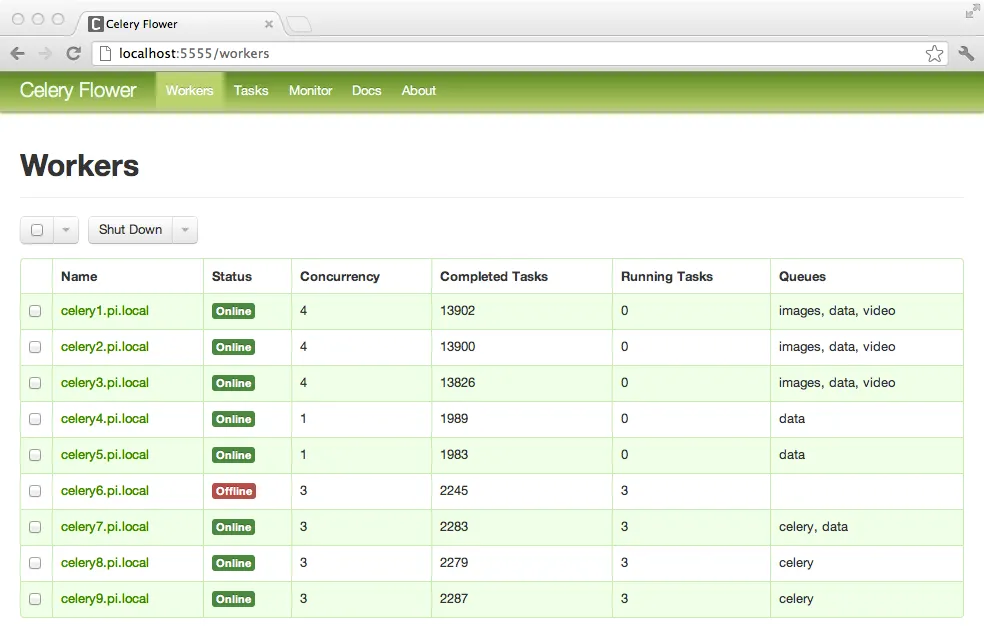
Keeping it short, Flower is a web-based monitoring tool that allows us to inspect tasks, monitor worker status, view task arguments and results, revoke or terminate tasks, and check runtimes and failures.
We can start Flower with:
celery -A celery_app:celery_app flowerBy default, Flower runs on http://localhost:5555. It exposes operational data and remote-control features, so enable authentication and avoid exposing it directly to the public internet in production.
The Flower documentation includes this example of its worker dashboard:
And yes… now when someone mentions Flower, I don’t think about roses anymore. 🌹