One of the things I love about running a homelab is that, sooner or later, something will break in a way that makes no sense. And when that happens, I get to play detective.
This time, the suspect was a cheap HOBEIAN water leak sensor (model ZG-222Z) on my Zigbee2MQTT network. I have several identical units around the house… under the washing machine, behind the dishwasher, and near the water heater. They all worked, except this one.
Table of contents
Open Table of contents
The symptom
The sensor was paired and visible in Zigbee2MQTT. It reported battery information and link quality whenever I pressed its physical button. However, it never reported the one thing it was designed to detect: water. I tried a few things like a wet finger and a screwdriver across each pair of external contacts, but the water_leak value remained null.
That was unusual because my other units had the same model and the same softwareBuildID, 0122052017. They all also used the same coordinator, an SLZB-06 with a CC2652P radio. The model was supported and the other sensors worked, so the problem appeared to be limited to this unit.
I had paired it months earlier, and it had behaved this way from day one. After updating Zigbee2MQTT and the coordinator firmware, I found some time and I finally decided to investigate it properly.
A distracting bind error
When I clicked Reconfigure in Zigbee2MQTT, the logs showed this error:
z2m: Failed to configure '0xa4c138ec359f8719', attempt 1
(Error: Bind 0xa4c138ec359f8719/1 genPowerCfg from
'0x00124b0031e0dbec/1' failed (AREQ - ZDO - bindRsp after 10000ms))
The stack trace went through zigbee-herdsman-converters/src/devices/tuya.ts. At first, that looked like a mismatch because the device page identified the sensor as HOBEIAN rather than Tuya.
However, the path was correct. In the official converter, ZG-222Z is a HOBEIAN white-label entry in the generic Tuya TS0207_water_leak_detector definition. Zigbee2MQTT can show HOBEIAN as the vendor while using a definition stored in tuya.ts.
The failed operation was also more specific than the full stack trace made it seem. It was trying to bind genPowerCfg, the Power Configuration cluster used for battery reporting. That failure could affect battery updates or leave the device marked as not fully configured, but it did not prove that the water alarm path was broken. The leak alarm itself uses the IAS Zone cluster.
Testing the IAS enrollment theory
The next theory was more plausible. Water leak sensors commonly use the Zigbee IAS Zone cluster (ssIasZone, cluster ID 0x0500, or 1280 in decimal). During enrollment, the CIE (Control and Indicating Equipment) writes its IEEE address to the sensor and assigns it a zone ID. The sensor then changes its zoneState from 0 to 1 and knows where to send alarm notifications.
Battery-powered Zigbee devices spend most of their time asleep, so configuration requests may time out if the device is not awake when they arrive. I removed the sensor from the network, enabled permit-join mode, reset it, and paired it again while pressing its button every few seconds. My aim was to keep it responsive while Zigbee2MQTT completed the interview and enrollment.
It paired within seconds, but the problem remained. There were still no water_leak events.
I then opened Dev Console → cluster ssIasZone → read attributes. I pressed the sensor button at the same time so that it would be awake for the request. The response was:
{
  "iasCieAddr": "0x00124b0031e0dbec",
  "zoneState": 1
}
The IEEE address matched my SLZB-06, and zoneState: 1 means that the sensor was enrolled. This did not prove that every part of IAS reporting was perfect, but it ruled out missing enrollment as the most likely cause.
The decisive test: zoneStatus
At this point, I wanted to know what the device itself believed, without relying on whether an unsolicited alarm event reached Zigbee2MQTT.
The IAS Zone cluster includes an attribute called zoneStatus. It is a bitmap: bit 0 is Alarm 1, which represents water detection for this type of sensor; bit 2 is tamper; bit 3 is low battery; and the remaining bits describe other IAS conditions. Reading zoneStatus shows the state stored by the device at that moment.
I tested the two pairs of external contacts separately. Touching the upper pair with a wet finger produced:
{ "zoneStatus": 0, "zoneState": 1, "iasCieAddr": "0x00124b0031e0dbec" }Touching the lower pair produced the same result:
{ "zoneStatus": 0, "zoneState": 1, "iasCieAddr": "0x00124b0031e0dbec" }However, bridging all four contacts at the same time changed the state:
{ "zoneStatus": 1, "zoneState": 1, "iasCieAddr": "0x00124b0031e0dbec" }That result was the key. The sensor could detect an alarm and update its internal IAS state, so the Zigbee network, enrollment, and converter were unlikely to be the root cause. The unusual behavior pointed instead to the electrical path between the external contacts and the detection circuit.
Comparing it with a working sensor
I repeated the same test on a working unit. On that sensor, either physical pair completed the sensing circuit and triggered the alarm.
The faulty unit behaved differently: neither pair worked on its own, but bridging all four contacts did. The most likely explanation was an open connection somewhere in a path that should have joined contacts belonging to the same electrode. My finger or the water was providing the missing bridge when it touched all four contacts.
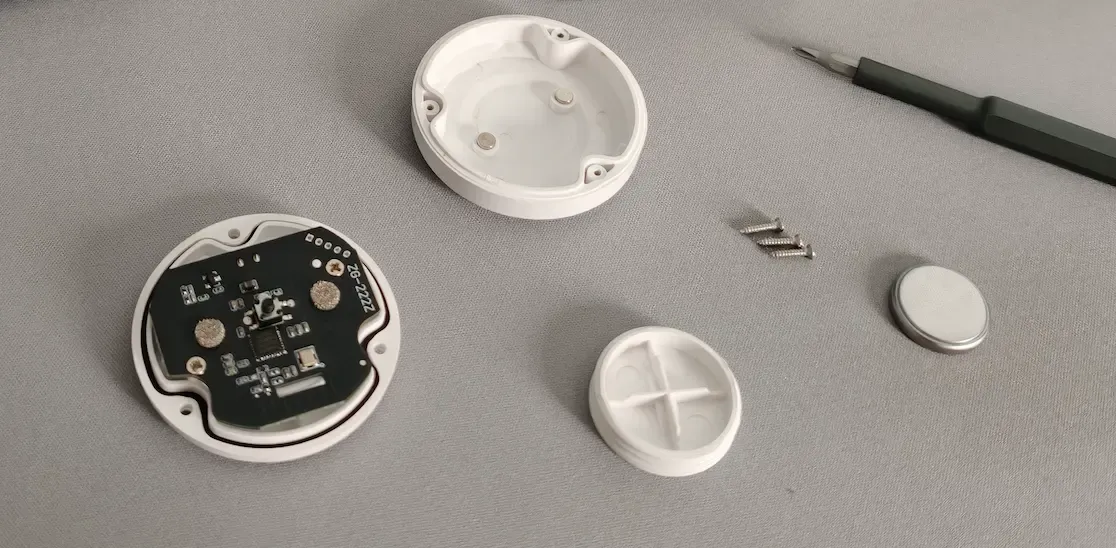
That did not tell me the exact physical cause. It could have been a cracked PCB trace, a solder joint, or a pressure contact between the enclosure and the PCB. Opening the sensor did not reveal a break clearly enough to prove which one had failed. A continuity test with a multimeter would be needed to locate it with confidence (but I didn’t have one at that time…).
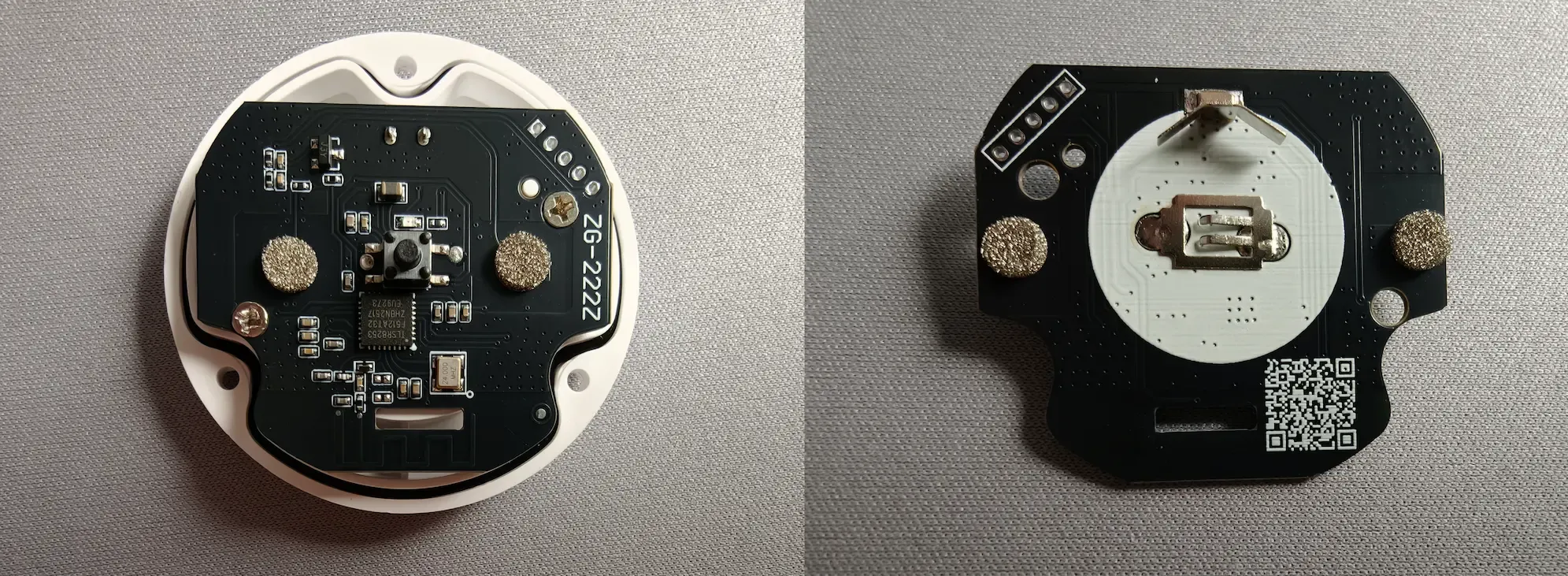
The important conclusion was narrower but still useful: the fault was probably an open internal connection, not a Zigbee configuration problem.
A temporary workaround
I bridged the suspected open connection with a short piece of solid-core wire held in place by the closed case. After reassembly, either pair of contacts triggered water_leak: true, strongly supporting the open-connection theory.
It worked, but it is only a temporary workaround. A soldered jumper or a replacement sensor would be safer and more reliable.
Lessons learned
- Follow the evidence layer by layer. A failed battery-cluster bind did not explain an IAS alarm problem.
- Test hypotheses directly.
zoneStateruled out enrollment, whilezoneStatuspointed to the hardware. - Compare with a working device early. It revealed the abnormal contact behavior immediately.
And not a lesson but a reminder:
- A workaround is not a repair. The wire worked, but a soldered connection or replacement sensor would be more reliable.