Table of contents
Open Table of contents
Introduction
I had been running Pi-hole as the DNS at home for a long time, and honestly I had no complaints. It works, it blocks what it has to block, and you can forget about it for months. But you know how the homelab thing goes: as soon as something has been working too well for too long, you start to feel the itch to break it and set up something else.
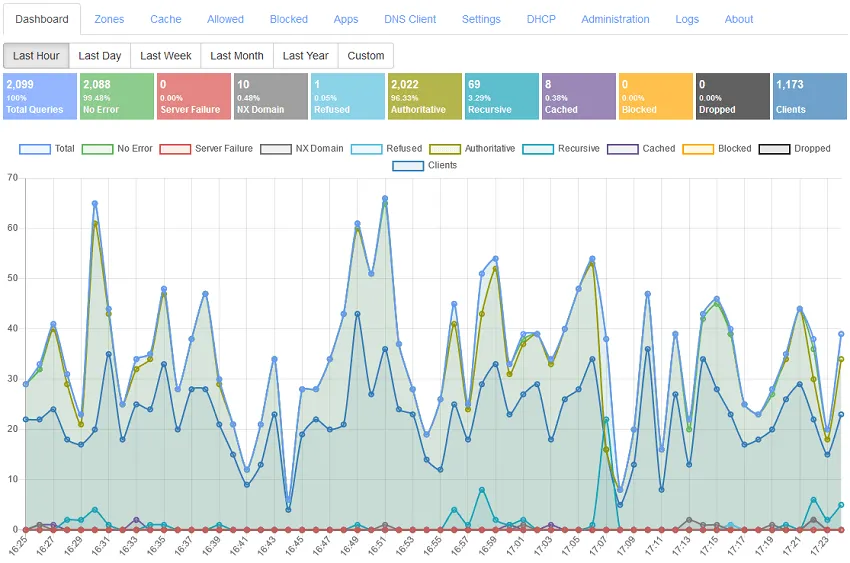
So a few weeks ago I decided to try Technitium DNS Server, and I want to write about the change because, more than the migration itself, the interesting part was everything I ended up learning about how DNS actually flows in my own network (which, it turns out, was not exactly how I thought it worked).
So what is Technitium?
For anyone who hasn’t heard of it, Technitium is a pretty complete DNS server that can do almost anything: recursive resolver in the style of Unbound, forwarder, authoritative server and, of course, ad blocker like Pi-hole or AdGuard Home. All of it from a web interface that, while not pretty (they add dark mode support not a while ago for example…), gives you fine control over what is going on.
If I had to place it among the usual suspects: Pi-hole is the simplest and most direct, AdGuard Home is one step above in terms of interface and modern options, and Technitium is the most powerful of the three at the pure DNS level, at the cost of also being the least plug and play.
So why change, if Pi-hole was working fine for me? Mostly to have more control, to put more things into a single service and, to be honest, because in the end the homelab is also about learning by tinkering.
The starting setup
My network runs on OpenWrt, which handles DHCP and part of the DNS. The starting setup was the typical one: Pi-hole as the main DNS and the router as fallback, announced over DHCP with something like this:
list dhcp_option '6,192.168.0.12,192.168.0.1'When I added Technitium to the mix, I just changed the first IP to its own:
list dhcp_option '6,192.168.0.11,192.168.0.1'Where .11 is Technitium and .1 is the router itself with dnsmasq acting as a safety net. So far, easy.
The question that actually taught me something
While going through the dnsmasq config in OpenWrt I found this line:
option allservers '1'And a doubt hit me: how exactly does the router decide which upstream DNS to ask? Should I set strictorder to force an order? Is Technitium really getting the queries I think it is getting?
It turns out allservers and strictorder do quite different things. With allservers on, dnsmasq sends the query to all upstream DNS servers at the same time and keeps the one that answers first. With strictorder, it tries them in strict order: first the first one, and only if it fails does it move to the next.
At first I thought this was only a router-internal detail and not really relevant for me. But then I started thinking about how clients actually behave, and the whole thing flipped around.
Clients do whatever they want
Here is the uncomfortable truth: when you hand a client two DNS servers over DHCP, you cannot really trust the order. macOS, Windows, Android… they all do their own thing. Some query both in parallel, some pick the “fastest” one, some round-robin. So even with Technitium listed first, a non-trivial chunk of queries from my devices were going to skip Technitium entirely and hit the router directly. Damn it!
That defeats half of the point of having Technitium in the first place: inconsistent ad blocking, inconsistent logs, and a fragmented view of what is actually being resolved at home.
Turning the router into a funnel
The trick that made everything click was to stop thinking about the router as an independent second DNS, and start thinking about it as a funnel that always ends up in Technitium anyway.
To do that, I configured the router’s own upstream DNS like this:
- First:
192.168.0.11(Technitium itself) - Second:
194.242.2.4(Mullvad DNS) as a true emergency
And then, and this is the key part, I turned on strictorder on the router. With strictorder, dnsmasq will always try Technitium first, and only fall through to Mullvad if Technitium does not answer at all. No parallel queries, no “fastest wins”, no surprises.
So now the picture is:
- If a client picks Technitium directly → query goes to Technitium. ✅
- If a client picks the router → router forwards to Technitium → query still goes to Technitium. ✅
Either way, every single query in the house passes through Technitium when it is up, which is exactly what I wanted from the start. And as a side effect, my Technitium logs are finally telling me the whole story.
And what about when Technitium dies?
This is the wife acceptance factor part of the design. If the Technitium container crashes, the host reboots, or I break something while tinkering at 1 AM, I do not want the whole house to lose internet.
Thanks to strictorder on the router, the failure mode is graceful: clients that were using the router as DNS will hit a small timeout on Technitium, then fall through to Mullvad, and resolution keeps working. Clients that were using Technitium directly will eventually retry against the router (their DHCP-assigned secondary), and from there fall through to Mullvad too.
It is not zero-impact, you do feel a small lag during an outage, but the network does not go down. And that, in homelab terms, is the difference between “I will fix it tomorrow” and “fix it RIGHT NOW”.
For completeness, Technitium itself is configured to forward to freedns.controld.com (Control D) and dns.mullvad.net, both over encrypted DNS. So when everything is healthy, the chain is: client → Technitium → Control D / Mullvad. Clean and consistent.
How it ended up
With all of this understood, the final setup is:
- Clients: get Technitium and the router as DNS over DHCP.
- Router (dnsmasq): forwards to Technitium first, Mullvad as emergency fallback, with
strictorderon so the order is actually respected. - Technitium: forwards to Control D and Mullvad over encrypted DNS.
The trick of pointing the router’s upstream at Technitium feels a bit weird the first time you see it (Technitium ends up “in the path” twice), but it is exactly what makes the whole thing consistent: no matter which DNS a client decides to use, the query always goes through Technitium when it is healthy, and always still resolves when it is not.
And the important thing is not the config itself, but understanding why each piece is where it is.
Also, while I was at it, I cleaned up the IPs
Since I was already touching things, I took the chance to review how I had the addressing split, which was a bit messy. Now I follow more or less logical blocks:
192.168.0.10–19for infrastructure (DNS, proxy and friends).192.168.0.20–29for servers.192.168.0.100and up for IoT stuff.192.168.0.150and up for personal devices.
A small thing, but it helps a lot when a new Raspberry Pi shows up on the desk and you have to decide in two seconds which static IP to give it without overthinking it.
To wrap up
The change itself (replacing Pi-hole with Technitium) is the least interesting part of this story. What I really take away is that DNS at home is not just about which server you run, but about making sure that every query actually goes where you think it goes, even when clients decide to be creative about it.
The router-as-funnel trick, with strictorder doing the heavy lifting, is one of those small ideas that looks weird on paper (Technitium ends up referenced twice) but solves two problems at once: consistency when everything is up, and a graceful fallback when it is not. Exactly the kind of design I like in a homelab — boring on a good day, forgiving on a bad one.
If you are happy with Pi-hole, you do not need to change to anything. But if you feel like tinkering, having more control over what your DNS does, and learning a couple of things about how clients and routers really behave along the way, Technitium is well worth it. It is not as plug and play or pretty, but in exchange you learn quite a bit, which in the end is what this is all about.